How to Record Stereo Audio with a CL101 Paired Edition
Any audio interface with at least two microphone input channels can be used to record a stereo source, such as a piano, a pair of speaker cabinets, or a live stage performance.
Here are the key things to remember when recording in stereo:
The source you are recording must be a stereo signal, not a mono one.
In your DAW, create a stereo track and set the input source to analog channels 1+2.
Connect the two CL101 microphones to the audio interface, enable 48V phantom power, and make the necessary gain adjustments.
XY Stereo Mic Technique
There are several established methods for stereo recording. The XY stereo technique is one of the most common due to its simple setup.
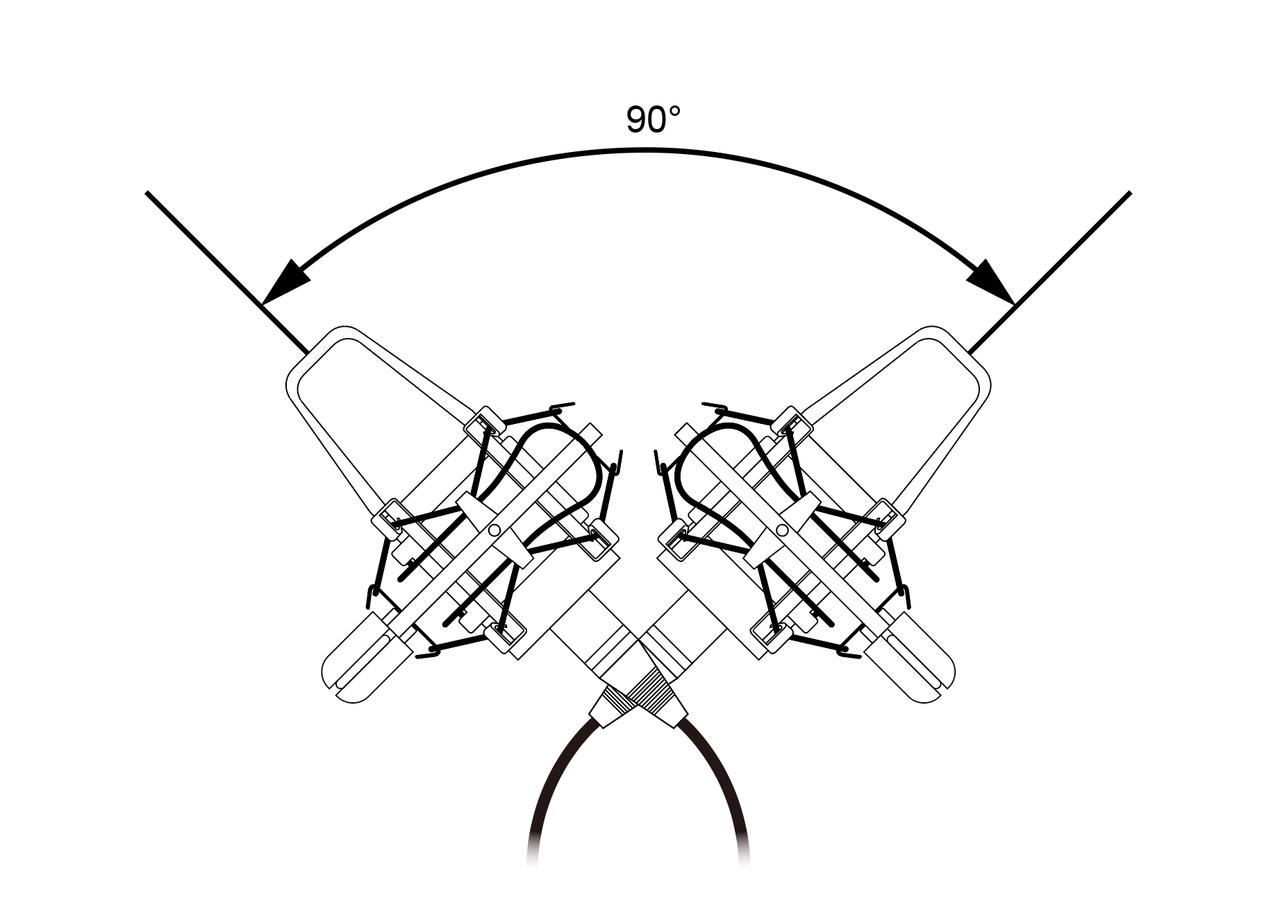
To use this method, place two identical microphones with either cardioid or supercardioid polar patterns close together, so their diaphragms form a 90-degree angle with each other.
(The accompanying image is for reference only; please adjust your setup based on your actual recording environment.)
It's crucial to ensure the distance between the two diaphragms is as close as possible without them touching. This arrangement is designed so that the sound reaches both microphones at roughly the same time, which provides accurate stereo imaging. In post-production, you can pan these two audio tracks to the hard left and hard right channels to achieve a full stereo effect.